Troubleshooting Guide
Why isn't my calendar updating?
Let's work through the most common reasons your SportCalendar events might not be updating.
Check the feed, then the calendar app
Quick Answer
Your SportCalendar updates automatically. If changes aren't appearing yet, the issue is usually your calendar application not refreshing the subscription yet.
What are you seeing?
Choose the problem that sounds closest and jump straight to the matching checks.
Missing events
A fixture or favourite is not showing in your calendar.
View stepsFixtures haven't updated
A time, date or fixture change is not appearing yet.
View stepsCalendar doesn't appear
SportCalendar is not visible in your calendar list.
View stepsSubscription won't add
Your calendar app is rejecting or ignoring the feed link.
View stepsEvents on one device only
SportCalendar appears on your phone but not your computer, or the other way round.
View stepsChanges taking too long
You have made a change, but the subscribed calendar is still behind.
View stepsUse this diagnostic flow
Work from SportCalendar outward. If SportCalendar and the feed are correct, the calendar app is usually waiting to refresh.
- 1
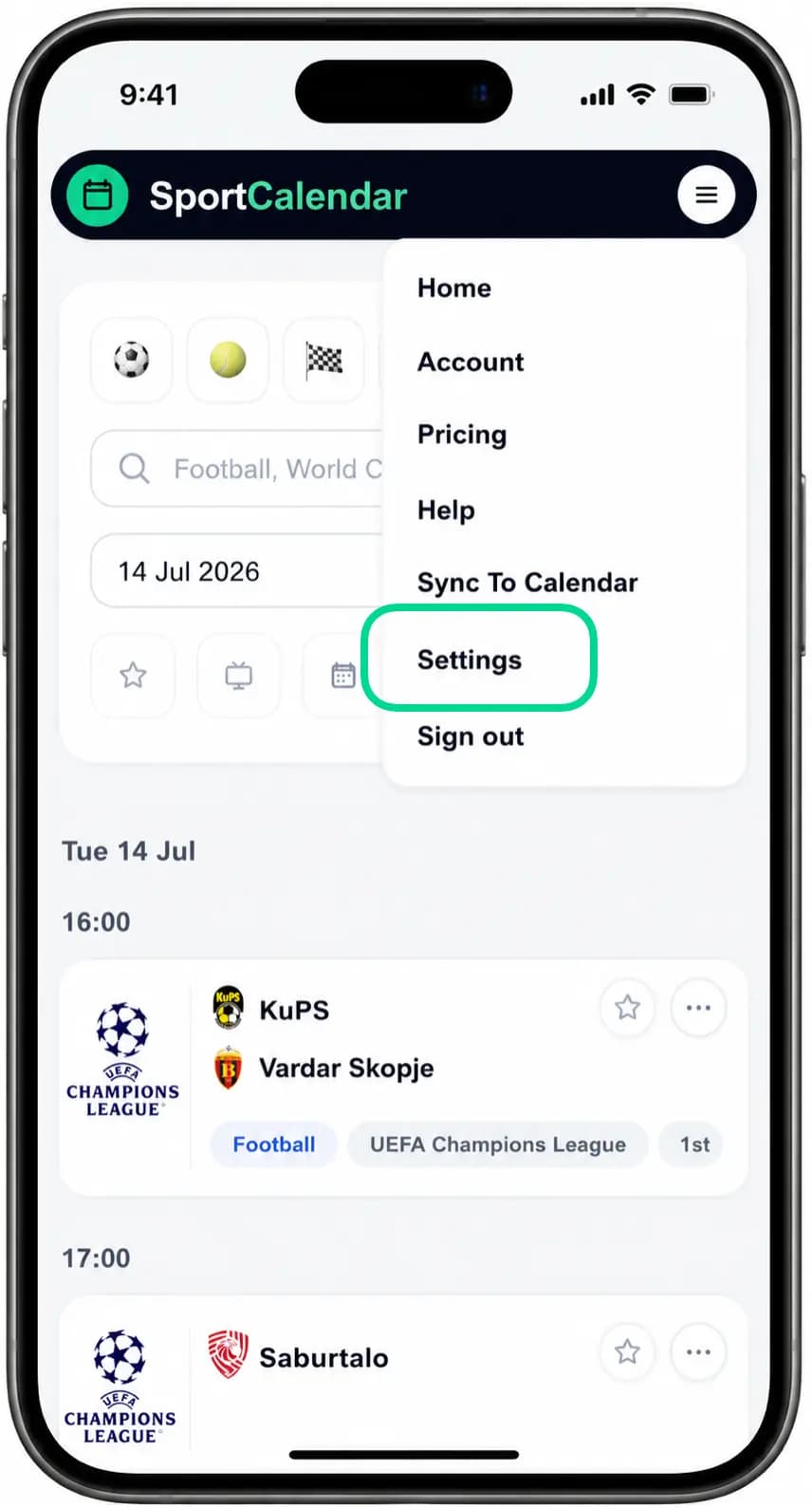
Navigate to Settings
Open Settings from your account menu or the shortcut buttons.
- 2
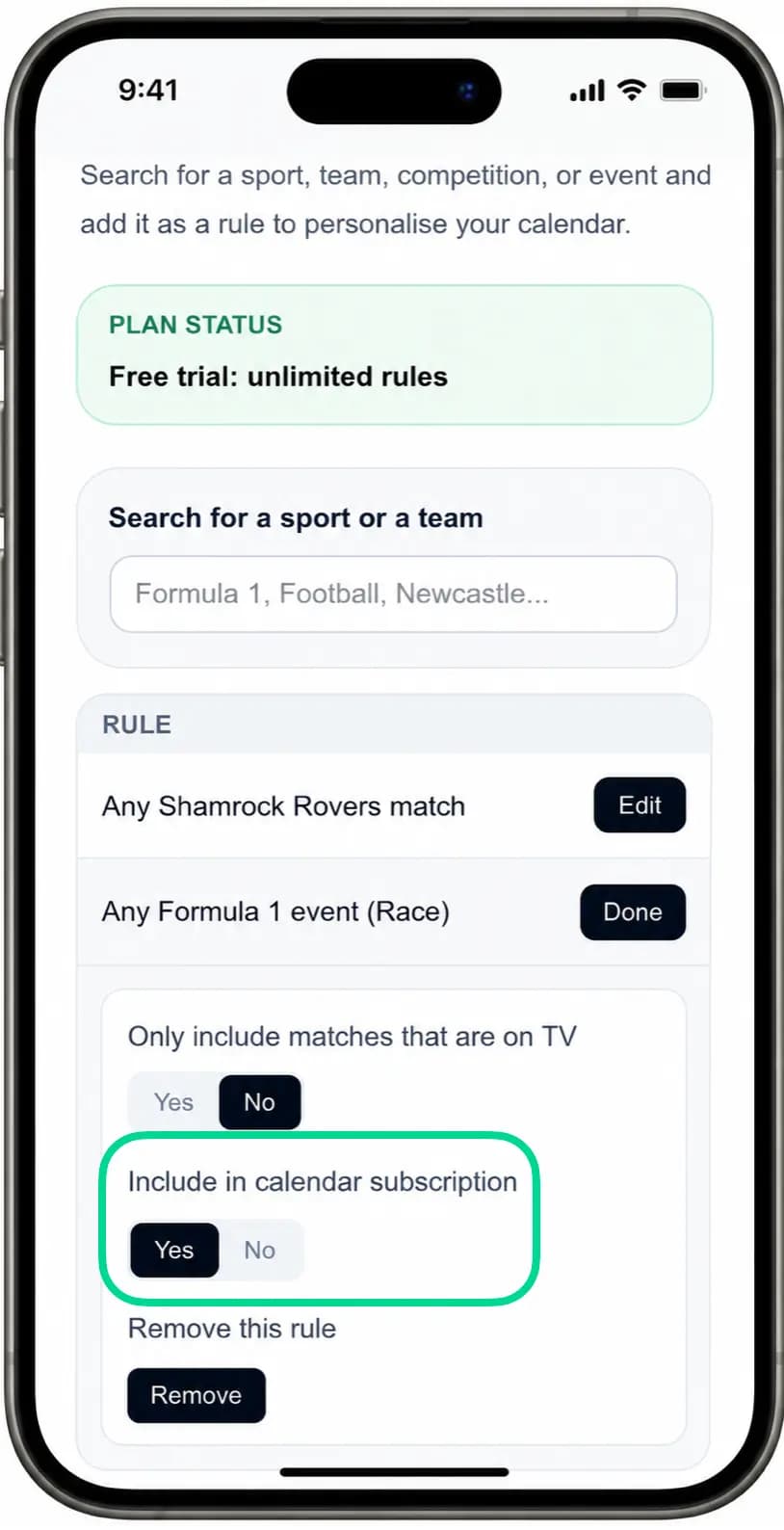
Check the filters
Check the rule is included in your calendar subscription.
- 3
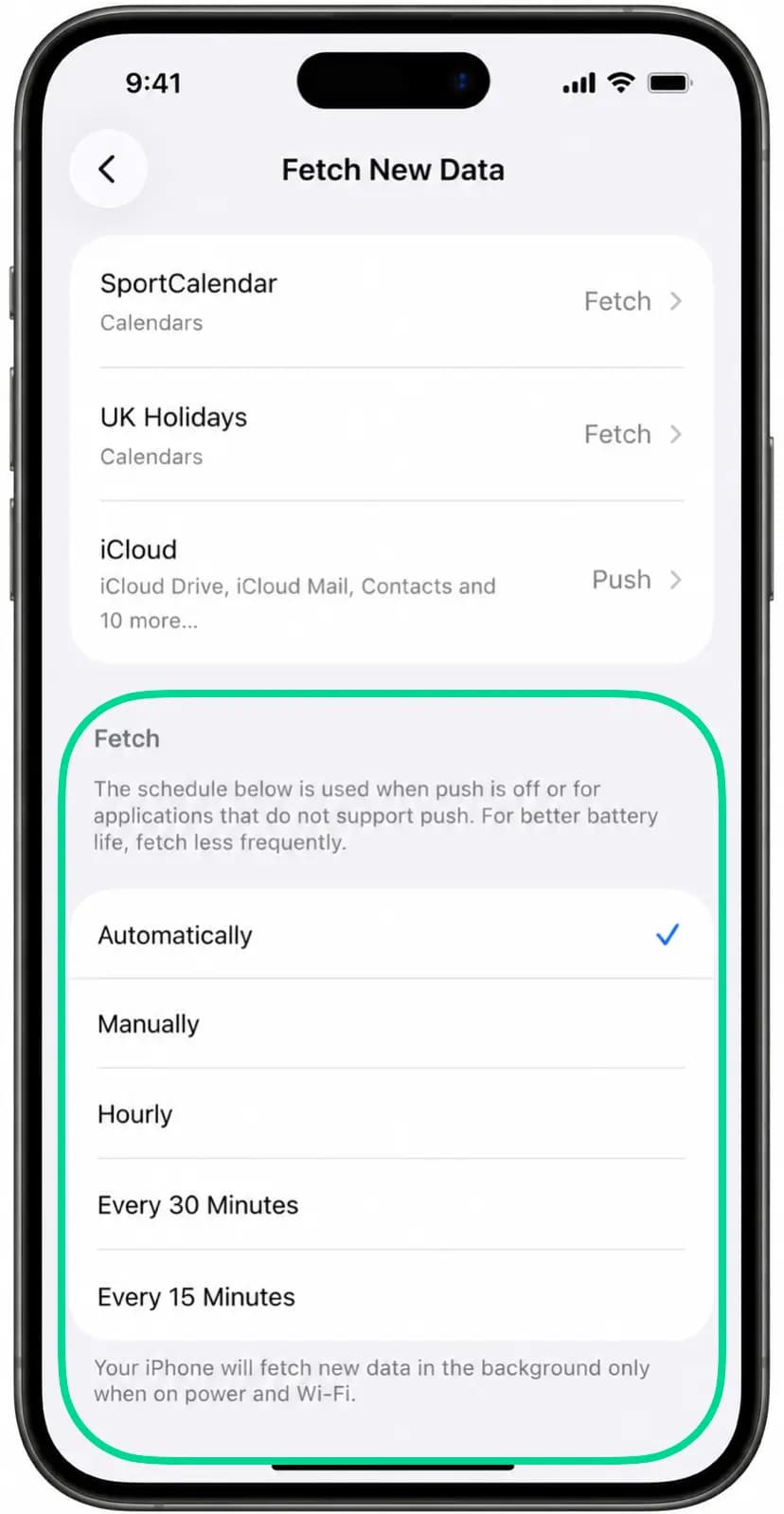
Check the calendar app
Check your Calendar settings to make sure calendar subscriptions are enabled and refreshing as expected.
- 4
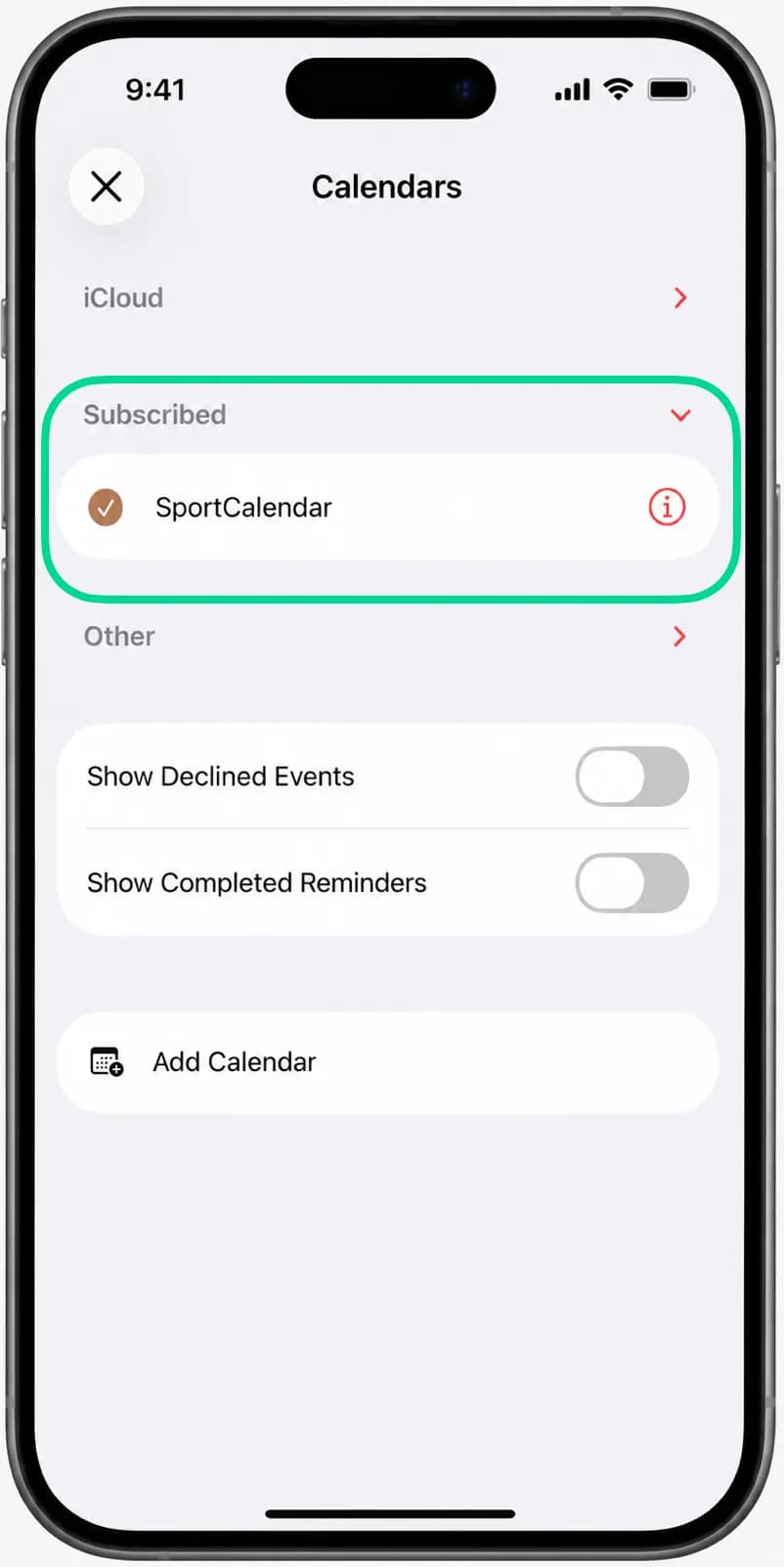
Check the device
If one device is different, confirm the same subscription exists on that device or account.
- 5
Re-add if needed
If the subscription looks broken, remove it from the calendar app and add your SportCalendar link again.
Troubleshooting journeys
Open the situation that matches what you are seeing.
Missing eventsOpen
Start by working out whether the event is missing from SportCalendar or only missing from your calendar app.
- 1Search for the event in SportCalendar.
- 2Check that the team, competition or event is still in your favourites.
- 3Check whether any filters are hiding the event on the schedule page.
- 4If it appears in SportCalendar, wait for your calendar app to refresh the subscribed calendar.
- 5If it still does not appear later, remove and re-add the subscription in your calendar app.
Fixtures haven't updatedOpen
SportCalendar updates fixture changes in your feed, but calendar apps refresh subscribed calendars on their own schedule.
- 1Confirm the fixture has changed inside SportCalendar.
- 2Check that the subscribed calendar is still enabled in your calendar app.
- 3Give the calendar app time to refresh the subscription.
- 4Check the platform guidance below for Apple, Google and Outlook refresh behaviour.
- 5If the app still shows old data after a long wait, remove and re-add the calendar subscription.
Calendar doesn't appearOpen
If SportCalendar is not in your calendar list, the subscription may be disabled, added to another account or only added on another device.
- 1Open the calendar list in your calendar app.
- 2Look for SportCalendar under subscribed calendars, other calendars or internet calendars.
- 3Check that the calendar is ticked or enabled.
- 4Confirm you are using the same Apple, Google or Microsoft account where you added it.
- 5If you cannot find it, add the subscription again from Sync to Calendar.
Subscription won't addOpen
Subscription problems usually come from a copied link, browser handoff or calendar app support issue.
- 1Open Sync to Calendar and copy your current SportCalendar link again.
- 2Check that your internet connection is working.
- 3Try adding the link from a supported calendar app such as Apple Calendar, Google Calendar or Outlook.
- 4If a mobile app fails, try the same calendar account in a desktop browser.
- 5Try another browser if the calendar app handoff does not open.
Events on one device onlyOpen
A calendar subscription can be device-specific or account-specific depending on the calendar app.
- 1Check where you originally subscribed to SportCalendar.
- 2Confirm the second device uses the same Apple, Google or Microsoft account.
- 3Open the calendar list on each device and make sure SportCalendar is enabled.
- 4If it was added directly to one device, add the same SportCalendar link on the other device too.
- 5Use the platform guides below if you need device-specific setup steps.
Changes taking too longOpen
Delays are frustrating, but they are usually caused by your calendar provider waiting before checking the feed again.
- 1Confirm the change appears inside SportCalendar.
- 2Keep the subscribed calendar enabled.
- 3Wait for Apple, Google, Outlook or your calendar app to refresh.
- 4Avoid repeatedly deleting and re-adding unless the subscription appears broken.
- 5If changes never appear, remove and re-add the subscription from your calendar app.
Platform refresh behaviour
Apple, Google and Outlook all refresh subscribed calendars differently.
Apple CalendarOpen
Apple Calendar checks subscribed calendars automatically, but exact refresh timing varies.
- 1Check that the SportCalendar calendar is enabled in Apple Calendar.
- 2Wait for Apple Calendar to refresh the subscribed calendar.
- 3On Mac, check the subscription settings if you added the feed manually.
- 4If iPhone and Mac differ, subscribe on each device or account where you need the calendar.
Google CalendarOpen
Google Calendar usually manages subscriptions from Google Calendar on the web and refreshes them on Google’s schedule.
- 1Open Google Calendar on the web.
- 2Check that SportCalendar is listed under Other calendars.
- 3Make sure the calendar is selected and visible.
- 4Allow Google time to refresh the subscribed calendar.
OutlookOpen
Outlook refresh behaviour varies between Outlook on the web, Windows, Mac and mobile.
- 1Check the SportCalendar subscription in Outlook Calendar.
- 2Confirm it is enabled in the Microsoft account you use on each device.
- 3Use Outlook on the web if mobile or desktop settings are unclear.
- 4Give Microsoft time to refresh the internet calendar subscription.
Troubleshooting tips and important notes
Tip
Most calendar update delays are caused by your calendar provider rather than SportCalendar.
Important
SportCalendar cannot force Apple, Google or Outlook to refresh a subscribed calendar.
Common issues
Why doesn't my iPhone show the latest fixtures?
Your iPhone calendar app may not have refreshed the subscribed calendar yet. Check that SportCalendar is enabled in the calendar list, then give Apple Calendar time to refresh.
Read the Apple Calendar guideHow often does Apple refresh?
Apple controls refresh timing for subscribed calendars. Some changes appear quickly, while others can take longer.
How often does Google refresh?
Google Calendar refreshes subscribed calendars on its own schedule. It can take several hours for a feed change to appear.
Read the Google Calendar guideHow often does Outlook refresh?
Microsoft controls Outlook refresh timing. Outlook on the web is often the clearest place to check that the subscription is still enabled.
Read the Outlook guideWhy are events different on my phone and computer?
The subscription may have been added to one device or account but not the other. Check the calendar list and account on each device.
Can I force a refresh?
Usually not. SportCalendar updates your feed, but Apple, Google, Outlook and other apps decide when to fetch subscribed calendars again.
Why doesn't my Mac show the subscription?
If you subscribed on iPhone, the calendar may not automatically appear on Mac. Add the same SportCalendar link in Apple Calendar on your Mac or use a shared calendar account.
Check Mac setup stepsWhy are some events missing?
Check whether the event appears in SportCalendar and whether its team, competition or event is still in your favourites. If it appears in SportCalendar, your calendar app may still be waiting to refresh.
Why did an event move?
Fixtures can move when competitions or broadcasters change schedules. SportCalendar updates the feed, then your calendar app refreshes the subscribed calendar on its own timing.
Related articles
Still need help?
Browse the Help Centre or choose another guided path.